


Vendor demonstrations: making them actually useful
You've shortlisted vendors and now comes the part most organisations handle poorly: demonstrations. Most companies don’t prepare for their own demos and treat it like watching a movie - watch the performance, ask polite questions, then struggle to remember what happened when making decisions weeks later.
Demonstrations should be working sessions where you test systems against real requirements. Here's how to make them genuinely useful:
Set the agenda before the demonstrations
- Don't let vendors deliver generic pitches. Send specific use cases beforehand. Not "show us employee management, " but actual scenarios: "Show us how an HR administrator would process a departmental restructure affecting 35 employees, including reporting line changes, location moves, and role updates."
- Set clear expectations about what you want to see. Include your deal-breaker requirements, specific integrations you need, and any workflow peculiarities important to your operation. Good vendors will tailor demonstrations accordingly.
Demonstration structure
Don't pack the agenda too tightly. Leave space for questions and exploration. Vendors can supply videos after the demo for anything you didn't have time to cover in detail.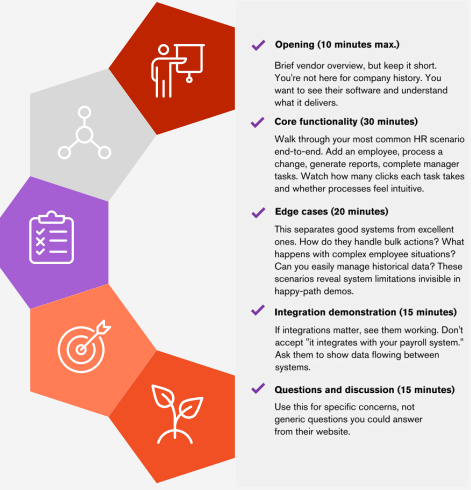
Whilst the vendor is running the demo, ask your attendees to complete a scorecard. The scorecard should be very simple in structure - you want something you can complete quickly whilst watching:
- Ease of use (1-5): How intuitive did the interface feel? Could your HR team and line managers use it without extensive training?
- Functionality fit (1-5): How well does it handle your specific requirements without workarounds or customisation?
- Performance (1-5): Did it feel responsive, or were there noticeable delays and sluggishness?
- Overall impression (1-5): Does this feel like a system your organisation would actually want to use?
Include space for notes such as specific features you liked, concerns arising, questions requiring follow-up.
Who should attend
Keep demonstration attendance consistent but representative. You want the same core group at every demo ensuring fair comparisons, whilst including people who'll use the system daily.
Your project lead (usually senior HR leadership) should attend every demo, completing scorecards and managing overall evaluation. Include your lead HR administrator focusing on day-to-day usability and workflow efficiency. Bring a key line manager evaluating ease of use from the management perspective. Have your IT representative assess technical aspects, security, and integration requirements.
Each core attendee should complete their own scorecard independently during demos, then compare notes afterwards. This prevents groupthink and captures different perspectives. The project lead consolidates feedback but shouldn't override individual scores. Different viewpoints often reveal important system limitations or strengths.
Most importantly, have the same core people attend all demonstrations. Additional attendees can join for specific topics, contributing from their unique perspectives.
What to watch for during demos
Pay attention to how many clicks common tasks require. If processing a straightforward employee change takes 12 steps, that's concerning.
Notice how systems handle errors. Ask them to show what happens when something goes wrong. Do error messages actually help users fix problems, or are they generic technical nonsense?
Watch vendor reactions to unexpected questions. Good systems (and vendors) handle curveballs gracefully. If every question outside their script causes panic, that's revealing about both product knowledge and system flexibility.
Ask about mobile experience if your team works remotely or travels. Many HRIS platforms look brilliant on desktop but are painful on tablets or phones. If mobile access matters to your workflow, see it demonstrated rather than taking their word for it.
Questions revealing truth
Instead of asking "Can you do X?" ask "Show me how you do X. " Watching the actual experience provides far more insight than yes/no responses.
Ask about recent customer implementations similar to yours. Can they share specific examples (with permission) of how they've solved similar challenges? Vague answers suggest limited relevant experience.
Dig into their support model during demonstrations. Who would you contact with problems? What are typical response times? Is support included in licence fees or an additional cost? These practical details matter more than feature lists.
How do they help new users get productive? Do they have online resources, training videos, or dedicated customer success support? User adoption makes or breaks HRIS implementations.
After each demonstration
Complete your scorecard immediately whilst everything's fresh in memory. Waiting until you've seen all vendors makes earlier demos blur together.
Send follow-up questions promptly. Good vendors will respond quickly with detailed answers. Poor vendors will take ages or give vague responses.
Schedule a brief debrief within 24 hours with your core evaluation team. This should be a short 15-minute session capturing initial impressions whilst they're current and identifying immediate follow-up questions.
Resist the urge to make decisions immediately after impressive demonstrations. The "wow factor" wears off quickly if systems don't actually solve your problems.